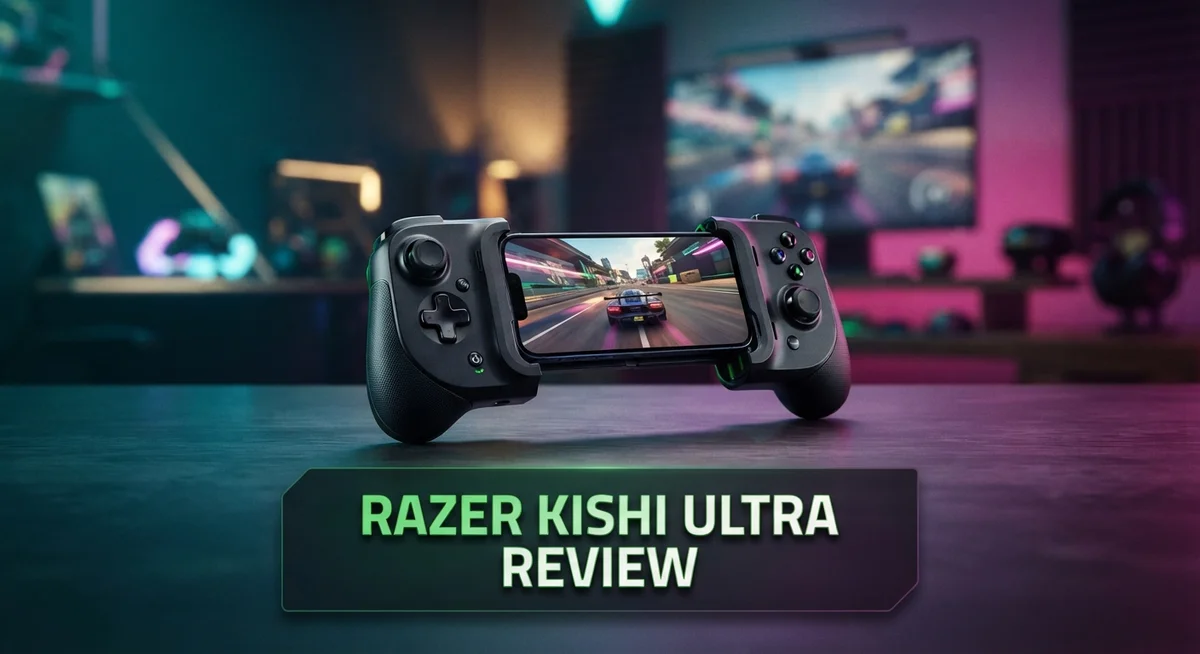
Mobile gaming just got a serious upgrade. The Razer Kishi Ultra brings console quality controls to your phone.
This controller connects through USB-C. It works fast and feels smooth in your hands.
You get dual analog thumbsticks that click. The 8 way D-pad and ABXY buttons use mecha-tactile switches. Every press feels sharp and precise.
Hall effect triggers make aiming and shooting feel natural. Two bumpers add more control options for fast paced games.
Android users get an extra treat. Razer Sensa HD Haptics adds realistic vibration feedback during gameplay.
Users rate this controller 9 out of 10 for performance and experience. That is a huge score in the mobile gaming world.
Is the Razer Kishi Ultra worth your attention? We tested it fully to help you decide. Let us break down what makes this controller special.
In a Nutshell
Here’s the quick rundown of what makes the Razer Kishi Ultra stand out.
-
Console-class ergonomics give your hands a comfortable grip during long play sessions. The full-sized controller design feels just like your favorite console gamepad.
-
Thumbsticks rotate a full 360 degrees. This gives you smoother control during fast-paced games.
-
The mecha-tactile D-pad and face buttons offer a satisfying click with every press. You feel every input clearly.
-
Remappable buttons let you customize your setup. Change controls to match your play style easily.
-
Dual bumpers add extra input options for shooters and racing games. They sit right where your fingers naturally rest.
-
On the downside, portability takes a hit. This controller earns only a 6 out of 10 for portability due to its larger size.
-
Compared to the Scuf Nomad, the Kishi Ultra is bulkier. The Nomad’s symmetrical thumbsticks reduce thumb cramp better over time.
Overall, this controller trades some portability for serious performance gains.
Design and Build Quality
The Razer Kishi Ultra feels like a real console controller in your hands. Console-class ergonomics mean your palms rest naturally during marathon gaming sessions without cramping or fatigue.
The build quality stands out immediately. You get a full-sized design that doesn’t compromise on materials or construction. Every button feels solid and responsive under your thumbs and fingers.
The dual analog thumbsticks offer 360-degree rotation, giving you complete freedom of movement in any game. Both sticks are clickable, so you can press them down for melee attacks or tactical maneuvers. The Hall effect triggers on the shoulder buttons deliver smooth, natural aiming in shooters and racing games.
The mecha-tactile D-pad and face buttons provide satisfying tactile feedback with each press. You feel a distinct click that confirms your input registered. This matters when you need precision in competitive matches or fast-paced action sequences.
Dual bumpers sit above the triggers, adding extra input options for games that demand complex button combinations. The remappable buttons let you customize your control layout to match your playstyle perfectly.
One trade-off exists here. The Kishi Ultra prioritizes performance and comfort over portability. Its larger footprint means it doesn’t slip into a pocket as easily as some competitors. If you move between devices frequently or travel light, this size matters.
The controller connects via USB-C, which keeps it tethered to your phone. This wired connection eliminates wireless latency but reduces your mobility compared to wireless alternatives.
Android users get an extra advantage with Razer Sensa HD Haptics. These vibrations add immersion to compatible games, making impacts and explosions feel more intense. iOS users don’t have access to this feature yet.
High user satisfaction reflects the design choices here. Performance ratings hit 9 out of 10, and user experience scores match that level. The controller delivers what serious mobile gamers want: responsive controls, comfortable grip, and reliable build quality.
If you prioritize performance and comfort over portability, the Kishi Ultra’s design delivers exactly what you need for extended gaming sessions.

- PC REMOTE PLAY — The power of a gaming rig now fits the size of a pocket; stream games using a PC and launch...
- FULL-SIZED FORM FACTOR FOR PHONES AND IPAD MINI — Game directly on a phone or unlock new levels of mobile...
- PRO-GRADE CONSOLE CONTROLS & ERGONOMICS ON MOBILE — Dominate Mobile Gaming with the esports grade...
Last update on 2026-08-29 / Affiliate links / Images from Amazon Product Advertising API.
Control Layout and Button Responsiveness
The button layout on the Razer Kishi Ultra follows a traditional console design. Your thumbs land naturally on the dual analog sticks without any awkward stretching. The mecha-tactile face buttons deliver crisp, audible feedback that makes every input feel intentional and precise.
The D-pad stands out as a mecha-tactile component as well. Each directional input registers cleanly, which matters most in fighting games and platformers where precision counts. You won’t experience any accidental diagonal inputs or mushy responses.
Trigger responsiveness deserves special attention here. The Hall effect triggers (L2 and R2) eliminate the dead zone problems you might face with cheaper controllers. In racing games, you get smooth throttle control from light presses to full depression. Shooters benefit equally, as analog trigger sensitivity translates perfectly to weapon handling.
The dual bumpers sit comfortably above the triggers. They respond instantly without requiring excessive force. This design works particularly well for games that stack multiple button combinations. Your fingers stay in their natural resting position while accessing all inputs.
Button remapping adds another layer of control flexibility. You can reassign functions to match your personal preferences or adapt to specific game requirements. This feature proves invaluable if you play across multiple game genres throughout your day.
The thumbstick rotation deserves emphasis again from a responsiveness angle. Since they rotate a full 360 degrees, you’ll never hit a mechanical limit mid motion. Analog stick drifting becomes less likely because the design avoids stress points that plague traditional controllers.
One practical consideration: the USB-C connection keeps your phone tethered during play. This eliminates wireless latency issues entirely. Your inputs register with zero delay, which matters in competitive scenarios or fast-paced action games.
Android users experience an additional layer of tactile immersion through Razer Sensa HD Haptics. These vibrations sync with button presses and in-game events. The haptic feedback reinforces your button inputs, creating a more immersive experience overall.
The overall button responsiveness rating sits at 9 out of 10. Most players report that controls feel snappy and reliable across hundreds of gaming hours. The mecha-tactile components maintain their responsiveness without degradation, ensuring consistent performance over time.
Haptic Feedback and Immersion
Haptic feedback transforms your gaming experience from simple button presses into genuine sensory immersion. The Razer Sensa HD Haptics system delivers this experience exclusively on Android devices, adding a layer of tactile sensation that standard controllers simply cannot match.
When you play action games, the haptics respond to in-game events with precision. Explosions feel like real impacts. Weapon recoil translates into vibrations you can feel in your palms. Racing games become more engaging when you sense tire grip and road texture through the controller itself.
The mecha-tactile triggers work in harmony with the haptic system. These Hall effect triggers provide resistance that adapts to different game scenarios. You feel the difference between a light tap and a full press, which matters in shooters and racing titles where trigger control determines your success.
The dual bumpers add another dimension to immersion. They respond instantly to your input, creating a snappy feedback loop between your actions and the game world. This responsiveness keeps you connected to the gameplay rather than feeling disconnected from it.
One important note: iOS users do not receive haptic feedback through this controller. The Sensa HD Haptics remain an Android exclusive feature. This means your immersion level depends on your device platform. Android players gain a significant advantage in this area.
The full 360-degree thumbstick rotation contributes to immersion too. You can make smooth, continuous movements without dead zones interrupting your control. This fluidity keeps you in the game mentally rather than fighting against controller limitations.
The mecha-tactile D-pad and face buttons reinforce this immersion further. Each press produces a satisfying click that confirms your input registered. You know exactly when a button press counted, which builds confidence during intense gameplay moments.
The console-class ergonomics support extended play sessions where immersion truly matters. Your hands stay comfortable, so you focus entirely on the game rather than controller fatigue. This comfort layer enables deeper engagement with every title you play.
Top 3 Alternatives
8BitDo Ultimate Controller

- Compatible with Windows PC, Apple, SteamOS, and Android devices – 2.4G and wired connection for Windows, and...
- TMR Joysticks with RGB Fire Ring - Offers higher sensitivity, greater precision, and enhanced durability, with...
- 8BitDo Exclusive Wireless Technology - “8Speed”, it delivers an exceptionally stable 2.4G connection with...

Last update on 2026-08-29 / Affiliate links / Images from Amazon Product Advertising API.
The 8BitDo Ultimate Controller works great for mobile gaming. It connects to your phone with a secure grip and offers reliable wireless performance. The controller has customizable buttons, so you can set up games exactly how you want them.
This device supports many games across different platforms. The battery lasts a long time between charges. Players love the comfortable grip and responsive buttons. The build quality feels solid in your hands.
Backbone One Mobile Gaming

- PLAY VIRTUALLY ANY GAME, ANYWHERE: Enjoy mobile gaming on the go. Play App Store hits like Call of Duty...
- PRECISION CONTROLS: Crafted for accuracy and comfort, this compact phone gaming controller features ultra-wide...
- IN-APP EMULATOR READY FOR iOS USERS: Turn your mobile controller into a retro gaming hub! Import your own...
Last update on 2026-08-29 / Affiliate links / Images from Amazon Product Advertising API.
Backbone One brings console-style gaming to your phone. The controller fits your device snugly and keeps your hands comfortable during long sessions. The pass-through charging feature lets you play while your phone charges.
The app works smoothly and connects to thousands of games. You get quick access to your game library right from the controller. The design feels premium and sturdy. Many gamers prefer this option for serious mobile gaming sessions.
Turtle Beach Atom Controller

- Convenient, Compact Shape Magnetically Fuses Together
- Low Latency Bluetooth Connection to Android Devices
- Built for Cloud Gaming on GeForce Now, Stadia, and More
Last update on 2026-08-29 / Affiliate links / Images from Amazon Product Advertising API.
Turtle Beach Atom Controller delivers solid performance for mobile gamers. It features responsive buttons and smooth analog sticks that feel natural to use. The controller connects quickly to your device and stays connected reliably.
The grip design prevents your hands from getting tired. The controller works with popular games and apps across platforms. Battery life performs well on a single charge. The compact size makes it easy to carry in a bag or pocket.
Each of these controllers offers different benefits. Your choice depends on what matters most to you—button customization, charging features, or portability. All three provide good value for mobile gaming fans who want better control than touchscreen options.
Portability and Compatibility
The Razer Kishi Ultra brings console-grade gaming to your mobile device. Its USB-C connection keeps your phone powered while you play, which matters for longer gaming sessions. However, this wired setup does limit how freely you can move around compared to wireless controllers.
The controller’s size works against pure portability. It’s a full-sized design that mimics traditional console controllers. Your backpack or travel bag will feel the weight and bulk. If you need something pocket-friendly, this isn’t your answer. The Scuf Nomad offers a smaller footprint if portability ranks as your top priority.
Compatibility spans Android and iOS devices with USB-C ports. The connection is straightforward. Plug it in and start playing. Your phone slides into the controller’s grip area, positioning the screen right in front of you. This setup feels natural and secure during intense gaming moments.
Android users gain a significant advantage here. Razer Sensa HD Haptics transform your gaming experience with vibration feedback that responds to in-game events. iOS users don’t receive this haptic layer, which creates a noticeable difference in immersion between the two platforms.
Game support extends across most popular mobile titles. The remappable buttons let you customize controls for specific games. This flexibility means you’re not stuck with default layouts. You can optimize button placement for each game you play.
The controller works best on a flat surface or while sitting comfortably. Standing play becomes awkward due to the tethered connection and screen positioning. This design choice prioritizes seated gaming sessions over on-the-go flexibility.
Battery drain represents another consideration. Your phone powers the controller through USB-C, so expect faster battery depletion during extended play. Bring a power bank if you plan marathon gaming sessions.
The Razer Kishi Ultra excels at delivering console-quality controls on mobile. Its portability rating of 6/10 reflects this reality. You gain premium gameplay experience while accepting reduced mobility compared to wireless alternatives. For gamers who value control quality over ultimate portability, this trade-off makes sense.
Gaming Performance and User Experience
The Razer Kishi Ultra transforms how you play games on mobile. Your fingers find a natural home on the controller thanks to its console-class ergonomics. The grip feels solid and comfortable, even during marathon gaming sessions.
Responsiveness defines the experience here. Every button press registers instantly. The clickable analog thumbsticks give you precise control in fast-paced games. You can rotate them a full 360 degrees, which matters when you need split-second accuracy. The mecha-tactile face buttons and D-pad deliver satisfying tactile feedback with each press.
The Hall effect triggers stand out for their smooth operation. They respond to subtle pressure changes, making them perfect for racing games and action titles. Your fingers rest naturally on these triggers without fatigue. The dual bumpers sit perfectly positioned above them, adding another layer of control options.
Android users get something special here. Razer Sensa HD Haptics brings vibration feedback that responds to in-game events. When explosions happen on screen, you feel them in your hands. This sensory layer makes games feel more immersive and engaging. iOS users won’t experience this feature, which represents a notable difference between platforms.
The USB-C connection keeps your phone attached to the controller. This tethered setup means you can’t move around freely, but it ensures zero latency. Your inputs reach the game instantly with no wireless delay. The controller works best when you’re sitting comfortably or playing on a flat surface.
Button remapping lets you customize controls to match your preferences. Different games have different needs, and this flexibility helps you adapt quickly. You can set up controls for your favorite titles and switch between profiles easily.
User satisfaction speaks volumes about this controller. Gamers rate its performance at 9 out of 10 and the overall user experience equally high. The design handles most popular mobile games smoothly. Whether you’re playing action games, RPGs, or shooters, the Razer Kishi Ultra delivers the control precision you need for competitive play.
Pros and Cons
Pros
- Console-class ergonomics let you play for hours without hand fatigue or cramping
- Snappy, responsive controls deliver immediate feedback for every action you take
- Mecha-tactile buttons and triggers feel satisfying and precise during intense gameplay
- Hall effect triggers respond to subtle pressure changes for nuanced control
- Remappable buttons let you customize controls to match your gaming style
Cons
- Larger size makes it less portable than smaller competing controllers
- Haptic feedback only works on Android devices, leaving iOS users without this feature
- USB-C connection keeps your phone tethered, limiting how you can hold the controller
Who Should Buy It
The Razer Kishi Ultra fits best with specific types of gamers. You should buy it if you play mobile games regularly and want console-level controls.
Competitive mobile gamers benefit most here. Games like Call of Duty Mobile, PUBG Mobile, and Fortnite demand precise thumbstick control. The 360-degree rotation and Hall effect triggers give you the accuracy you need to win. Your fingers stay comfortable during long ranked matches.
Android users get the full experience. You unlock Razer Sensa HD Haptics, which adds vibration feedback to your gameplay. This makes every action feel more real. Explosions rumble through your hands. Weapon recoil feels authentic. iOS players still get excellent controls, just without haptics.
Home gamers who prefer sitting down should consider this controller. The larger design shines when you’re on a couch or at a desk. Your hands rest naturally in an ergonomic position. You can play for hours without cramps or fatigue. The full-sized layout means every button sits exactly where your fingers expect it.
Casual players might want to look elsewhere. If you only play games occasionally or prefer portability, the Kishi Ultra’s size works against you. Smaller controllers pack easier into bags. The Scuf Nomad offers symmetrical thumbsticks that some gamers prefer, though it sacrifices the console-grade feel.
Avoid this if you need maximum portability. The controller doesn’t fold or collapse. It takes up real space in your backpack. If you game on the go constantly, a more compact option might suit you better.
Players who value customization love this controller. Button remapping lets you set controls exactly how you want them. Different games need different layouts, and the Kishi Ultra adapts instantly.
Console gamers switching to mobile will feel right at home. The ergonomics and button placement match what you already know. Your muscle memory transfers directly from your console controller. Gaming on your phone suddenly feels familiar and powerful.
Final Verdict
The Razer Kishi Ultra stands out as a serious pick for mobile gamers who want console level control. It brings precision and comfort together in one accessory.
This controller shines brightest for players who take mobile gaming seriously. If you stream games, play competitive titles, or want tactile feedback, this option delivers.
Compared to the Scuf Nomad, the Kishi Ultra offers a fuller grip and more surface area for your hands. The Nomad wins on symmetrical thumbstick placement, but the Kishi Ultra makes up for it with sheer control quality.
For long term use, the build feels solid and ready for repeated sessions. This is not a controller you outgrow quickly.
Overall, this ranks among the strongest mobile controllers currently available for Android users. iOS users can still enjoy the tactile buttons and hall effect triggers, though they miss the haptic feedback layer.
Think about your gaming habits before deciding. If you play mostly on the go, look at smaller alternatives. If you play seated or set up in one spot for longer sessions, this controller fits well.
The verdict: The Razer Kishi Ultra rewards patience and commitment. It asks you to sacrifice some portability, but returns that trade off with control quality that feels close to a home console experience.
For gamers who want the best possible feel on their phone, this pick is hard to beat. It sets a high bar for what mobile controllers can achieve.
Choose this controller if precision and comfort matter more to you than pocket friendly size. Your hands will thank you during long gaming sessions, and your gameplay will show the difference too.
Frequently Asked Questions
Does the Razer Kishi Ultra work with both Android and iOS?
Yes, the controller connects to both Android and iOS devices via USB-C. However, Android users get the full experience with Razer Sensa HD Haptics enabled. iOS users can still use all the mechanical buttons and triggers, but they miss out on haptic feedback features.
Can I remap the buttons on this controller?
Absolutely. The Razer Kishi Ultra includes remappable buttons, so you can customize controls to match your gaming style. This flexibility helps different players find their perfect setup without being locked into default layouts.
How does this compare to the Scuf Nomad?
The Kishi Ultra offers a fuller grip and more surface area for your hands. The Scuf Nomad features symmetrical thumbsticks, which some players prefer to reduce thumb cramp. The Kishi Ultra fits best with gamers who want console-class ergonomics, while the Nomad appeals to those prioritizing compact design.
Is this controller portable enough for travel?
The Razer Kishi Ultra has a larger size compared to competitors, which affects portability. If you need maximum portability, smaller controllers might suit you better. However, for long term use, the build feels solid and ready for repeated sessions at home or during extended gaming marathons.
What makes the triggers special on this controller?
The Hall effect triggers respond to subtle pressure changes for nuanced control. This technology lets you feel the difference between light taps and full presses, which matters most in racing games and action titles where precision matters.